Does someone still have access to
your Google Drive files?
Remember that PDF you shared with a contractor 3 years ago? Or the link you sent a vendor who has since moved on? They still have access. Finding and revoking those links one-by-one is an absolute nightmare.
Google Drive sharing is messy. Here's Why.
We share files during daily projects but rarely think about cleaning them up later. This leaves a massive trail of security gaps.
Forgotten Collaborators
Former employees, contractors, and agencies you worked with years ago still retain full access to your sensitive files and templates.
Public Link Exposure
"Anyone with the link can view" shares are easily forwarded, leaked, or indexed, making confidential data publicly accessible to anyone.
The Audit Nightmare
To audit manually, you must open each folder and file one-by-one to click "Share" and check names. If you have 500 files, this takes all day.
How FileLens Solves It Instantly
Instead of wasting hours checking files individually, get a single, unified view of all external exposures and fix them in seconds.
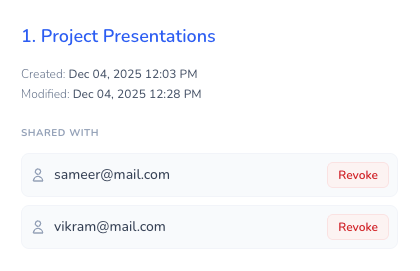
Revoke access quickly
Select client/contractor file/folder you wish to clean up, click "Revoke Access", and let the app update Google Drive instantly.
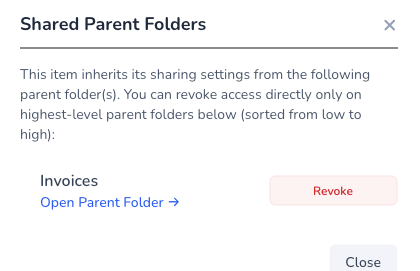
View all access exposure at a glance
No more guessing. Our interactive dashboard reveals exactly which directories, files, or links are shared externally or publicly, categorized by user domains.
Transparent Data Flow
We designed this tool with privacy first. Here is exactly how your data moves when you run an audit.
Session-Only Tokens
Authenticates via Google. The access tokens remain in your browser session and are never written to any disk.
Direct Fetching
Your browser pulls file metadata directly from Google API. File contents are never fetched or touched.
No Backend Database
We have zero storage servers or databases. There is literally no place where your metadata could be leaked.
Instant Revocation
When you revoke access, your browser sends the request to Google APIs. Clean up is immediate.
Storage-Free Guarantee
Zero-Data InfrastructureThere is no database system attached to this application to record your search metrics, credentials, or file details. Access keys remain in server session and Page tokens are routed to the browser.
Privacy & Security FAQs
Q. Does this application store my Google Drive files?
No. The application has no database. All list data is fetched live from your Google Drive account, loaded straight into your browser session memory, and instantly discarded when the tab is closed.
Q. What scope permissions are requested and why?
We request metadata access scopes to list files and query their sharing permissions, and a management scope to revoke access permissions. We never request permission to read, edit, or modify your document content.
Q. How is my connection secured?
Your connection is encrypted using SSL/TLS directly to Google. Since the processing executes locally, your credentials and Google APIs calls are communicated solely between your browser and Google's official endpoints.